06. Advanced Prompting Methods and the Divisional Secretariat "Promptathon" Model
Published 2026-09-14
Core Theme: A prompt is not a question begged of a computer. It is a powerful architectural blueprint. It builds reasoning step by step, assigns distinct administrative roles, and — used properly — re-engineers institutional processes themselves.
What are the types of prompting?
Most officers use generative AI the same way they use a search box. They type one line, read the first answer, decide it is good enough, and stop. For a birthday message that is perfectly fine. For a land permit, an audit note, a gazette comparison, or a policy analysis, it is the reason the output feels shallow — and the reason so many people conclude, wrongly, that the model is not very clever.
The model is not the limiting factor. The instruction is. Over the last few years a fairly stable set of prompting methods has settled into professional practice, and for the public service's complex files, gazettes and policy analysis they are worth learning the way a writer learns paragraph structure: not as tricks, but as standard forms you reach for depending on the file in front of you.
There are nine in common use, and they are easier to remember once you see that they answer three different questions. The first family — zero-shot, few-shot, negative and role-based prompting — shapes what the output should look like. The second family — chain-of-thought, chain-of-density and tree-of-thought — shapes how the model should think before it answers. The third family, the two retrieval methods, decides which facts the model is allowed to use at all. Figure 6.1 lays all nine out together.
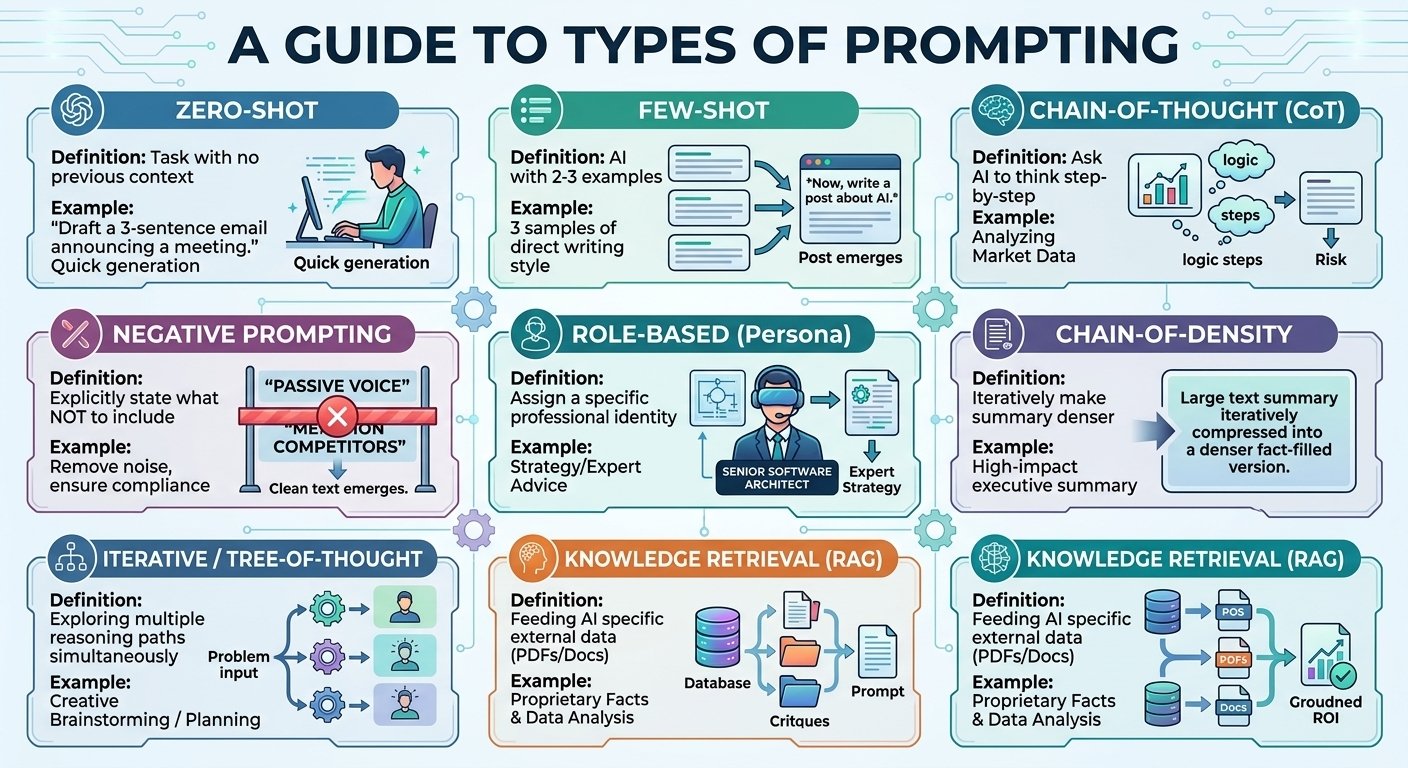 Figure 6.1: A Guide to Types of Prompting — the Zero-Shot, Few-Shot, Chain-of-Thought, Negative, Role-Based, Chain-of-Density, Tree-of-Thought, and Retrieval-Augmented (RAG) variants.
Zero-shot prompting: asking straight out
Zero-shot is the plain instruction. You describe the task, you give no examples, and you let the model draw on what it already knows. "Write a short official email informing member officers about tomorrow's District Agriculture Committee meeting" is a zero-shot prompt, and for that task it is the right one.
The reason zero-shot works at all is that a large model has already absorbed millions of documents of that general shape. You are not teaching it what a meeting notice is; you are only telling it which one you want today. That also tells you where zero-shot breaks down. It produces the average of everything the model has seen, which means a competent, generic result. Where your organisation has a house style, a legally mandated format, or a tone that must not vary, the average is not good enough.
Use zero-shot for low-stakes, general work: a first draft, a summary you will read anyway, a quick explanation, a rewrite for clarity. Treat it as the default starting point, and escalate to one of the other eight methods the moment the output has to satisfy someone other than yourself.
Few-shot prompting: teaching by showing
Few-shot prompting replaces description with demonstration. Instead of explaining your house style in adjectives — "formal, but warm, and concise" — you paste two or three finished examples that already have it, and then ask for a fourth in the same pattern.
This works because pattern-matching is what these models do best. Adjectives are ambiguous; a worked example is not. Two pension-appeal letters that were actually accepted carry your institution's sentence rhythm, its salutations, its level of legal caution and its typical length, all at once, without you having to name any of it. The instruction becomes simple: "Following the language pattern of the templates above exactly, draft the response for the third appeal."
Few-shot is the method to reach for whenever the format matters as much as the content — official correspondence that must conform to an establishments code, marking schemes, standard clauses, structured data such as JSON records that a downstream system will parse. Two good examples usually outperform two paragraphs of instruction. Pick your examples with care, though: the model will faithfully copy their flaws as well as their virtues.
Chain-of-thought prompting: making the model show its working
A model asked for an answer will produce an answer. A model asked to reason will produce reasoning, and then an answer — and the second answer is usually better. That is the whole of chain-of-thought prompting: you add an instruction such as "think step by step", or better, you name the steps you want it to take.
The reason this changes the output is mechanical rather than mysterious. These systems generate text one piece at a time, each piece conditioned on everything written so far. When the intermediate steps exist on the page, later steps have something correct to build on. When they do not, the model has to leap straight to a conclusion and hope. The visible working also hands you something valuable: a trail you can audit. If the conclusion is wrong, you can see where it went wrong instead of simply distrusting the whole output.
Use chain-of-thought whenever the task has stages that depend on each other — a pension arrears calculation, a comparison of three circulars that amend one another, a check on whether a draft decision is consistent with existing policy, any piece of analysis where you would expect a competent officer to work on paper rather than answer from memory. The cost is length and time. That is a fair price for work someone will sign their name under.
Negative prompting: naming what must not happen
Most instructions describe the desired output. Negative prompting describes the forbidden one, and it is the method most professionals discover last and then use every day.
The reason it matters is that a model's most dangerous habit is helpfulness. Asked for a circular number it does not know, it will produce a plausible-looking one, because a fluent answer scores better than an admission of ignorance. You close that gap by giving it a permitted escape route: "Under no circumstances write an inferred circular number. If you are not certain of the number, leave the placeholder [INSERT CIRCULAR NUMBER]. Do not exceed 200 words." Now the model has something correct to do when it does not know, and the blank placeholder becomes a visible flag for the human reviewer instead of an invisible fabrication.
The same technique removes the other irritations: no passive voice, no em-dashes, no words like "leverage" and "synergy", no advice beyond the scope of the question, no invented statistics. A short standing list of prohibitions, reused across every prompt you write, does more for output quality than almost anything else on this page.
Role-based prompting: giving the model a standpoint
Ask "is this proposal any good?" and you get a bland balanced answer. Ask a senior auditor of the Auditor-General's Department to review the same proposal, and you get specific, uncomfortable, useful questions about documentation and value for money.
Assigning a role narrows the model's field. A professional identity brings with it a vocabulary, a set of priorities, a characteristic list of worries and a standard of evidence — and by naming the role you pull all of that into the response instead of the generic middle. It costs one sentence and changes the output completely.
Role-based prompting earns its place most clearly in review and critique work, where the point is to find the weaknesses in your own thinking before someone else does. Have a draft read by a district land registrar, a procurement specialist, a parent with no technical background, a sceptical finance officer. Each pass finds a different class of problem. It is the cheapest form of peer review available, and — as the next sections show — it becomes genuinely powerful when you stop using one role and start using a panel of them.
Chain-of-density prompting: compressing without losing the facts
Ask a model to summarise a hundred-page report in three hundred words and it will give you three hundred words of connective tissue: "the report discusses several issues and makes a number of recommendations." Technically a summary. Informationally close to empty.
Chain-of-density fixes this by iterating under a fixed constraint. You ask for the summary, then ask for it again in the same word count, this time folding in the specific entities, figures and dates that the first version left out — and then again, and again. Because the length cannot grow, every round forces vague phrasing out to make room for facts. After three or four passes the same three hundred words carry the numbers a decision-maker actually needs.
This is the method for executive summaries of long documents: commission reports, cabinet memoranda, audit findings, research papers, a term's worth of meeting minutes. It is slower than one-shot summarising, and the difference in the result is not subtle.
Tree-of-thought prompting: comparing routes before committing
Chain-of-thought follows one line of reasoning to its end. That is a weakness when the first plausible route is not the best one, because the model — like a person in a hurry — will commit to it and rationalise forward.
Tree-of-thought asks for several distinct approaches first, requires the strengths and weaknesses of each to be set out honestly, and only then asks for a recommendation with the reasoning for the choice. You are separating generation from judgment, which is exactly what a good committee does and exactly what a rushed one does not.
Reach for it when the decision has genuine trade-offs rather than a single correct answer: a disaster-management contingency plan where speed and cost pull against each other, a policy choice balancing economic return against social harm, a technology decision that will be hard to reverse. Even when you have already made up your mind, the discarded branches are useful — they are the objections you will be asked about later.
Retrieval from documents: grounding the model in one authoritative text
The methods above improve how a model uses what it already knows. The last two change what it is allowed to know, and for institutional work they matter more than all the rest.
Retrieval-augmented generation over unstructured text means supplying the source document yourself — the gazette, the circular, the amended establishments code, the audit report — and instructing the model to answer only from its contents, quoting the clause it relied on and saying plainly when the document does not settle the question. The general knowledge baked into the model during training is frozen at some past date, averaged across the whole world, and cannot be cited in a memo. The PDF in front of you is current, local, and authoritative.
This is how you use AI on questions of entitlement, procedure and compliance — what leave a particular officer may take under the latest amendment, whether a tender step was followed, what a scheme actually says as opposed to what everyone believes it says. The instruction "answer only from the attached document, and cite the clause" converts the model from a source of claims into a very fast reader of your own sources.
Retrieval from data: putting the model next to the spreadsheet
The second retrieval method connects the model to structured information rather than prose: an Excel workbook, a SQL database, a registry export. The model's job changes from writing to querying — filtering, joining, comparing, summing, and then explaining the result in language a committee can follow.
The important distinction is that the arithmetic should happen in the data layer, not in the model's head. Language models are unreliable calculators and excellent query writers. Used properly, the model turns your question into a query, the database computes the answer, and the model explains what came back.
That pattern handles a large share of real administrative work: comparing the income thresholds of welfare beneficiaries across a divisional secretariat area and flagging applications that fall outside the criteria, reconciling two lists that should match, finding the fifteen cases out of four thousand that need a human decision. The value is not that the model is clever. It is that the officer stops spending three days on the sorting and spends the time on the fifteen cases instead.
Choosing between the nine
In practice you rarely use one method alone. A serious prompt is usually a role, plus a reasoning instruction, plus a short list of prohibitions, plus a grounding document — four of the nine stacked into one instruction. The table below is a quick way to find your starting point.
| If the job is… | Start with | Because |
|---|---|---|
| A quick draft or explanation | Zero-shot | The model's general knowledge is already enough |
| Matching an exact house format | Few-shot | Examples carry format better than adjectives |
| Multi-step analysis or calculation | Chain-of-thought | Visible steps are both more accurate and auditable |
| Anything with fabrication risk | Negative prompting | It gives the model a correct way to say "I don't know" |
| Critique and review | Role-based | A standpoint produces specific objections, not bland balance |
| A long document into one page | Chain-of-density | Fixed length forces facts in and padding out |
| A decision with real trade-offs | Tree-of-thought | Options compared before commitment, not after |
| A question of rules or entitlement | Retrieval (documents) | Only the authoritative text can be cited |
| A question about numbers or records | Retrieval (data) | The database calculates; the model explains |
How does chain-of-thought work on a real institutional problem?
The nine methods are easy to accept in the abstract and easy to underestimate. So it is worth watching one of them do something substantial. Of the nine, chain-of-thought is the most powerful method for solving a complex public service problem, and the example below is drawn from the institution every Sri Lankan knows from the inside: the Divisional Secretariat, where citizens go for land permits, welfare and business registration, and where the standard experience is four separate visits for one piece of paper.
Read it as a pattern rather than a one-off. The same reasoning chain applies to any service window in the public service. Figure 6.2 shows the traditional counter bureaucracy being re-engineered into a digital Single Window Platform.
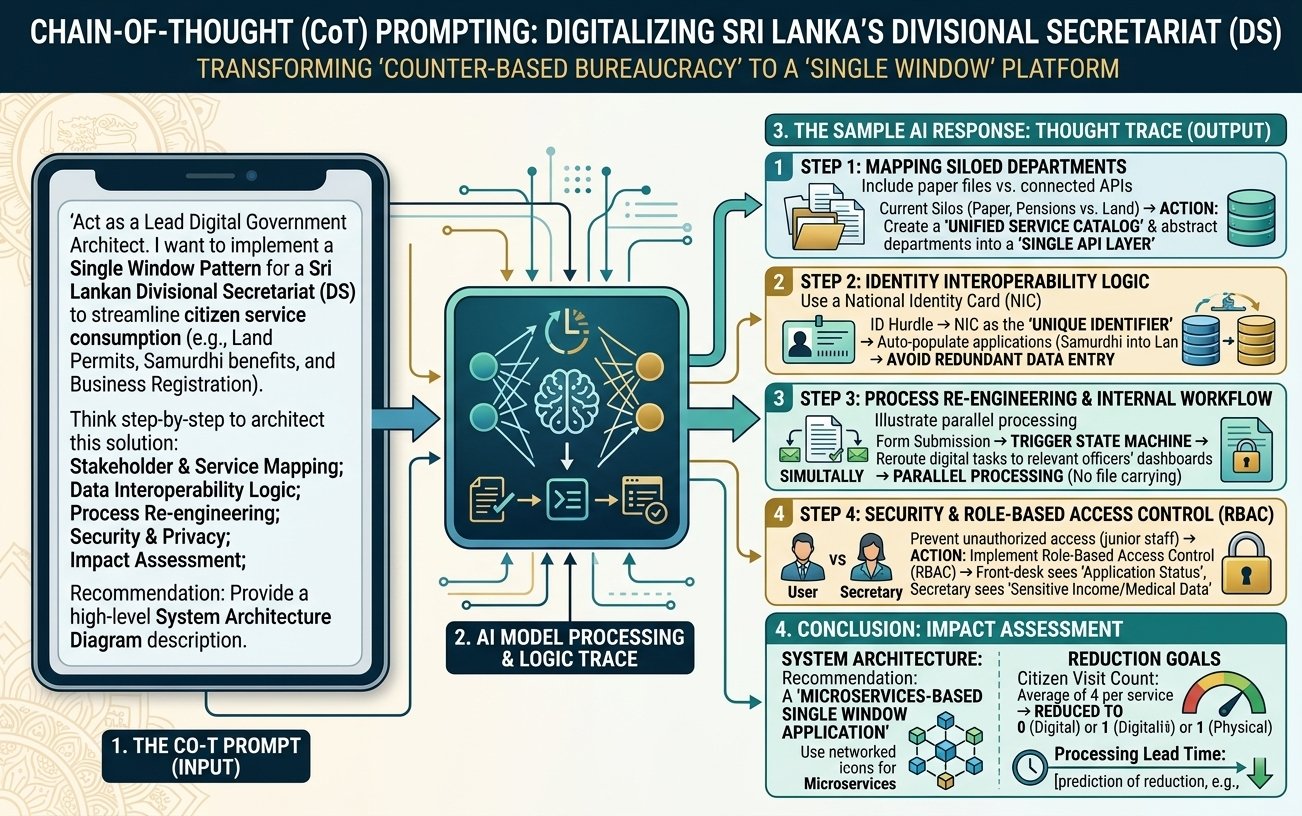 Figure 6.2: Chain-of-Thought (CoT) Prompting — re-engineering the Divisional Secretariat from 'counter-based bureaucracy' to a 'Single Window Platform'.
The instruction that started it
Notice how much work is done before the question is even asked:
"Act as the Lead Digital Government Architect of the Government of Sri Lanka. Design a Single Window Pattern to streamline citizen services at a Divisional Secretariat (land permits, Aswesuma welfare, and business registration). Think step-by-step through: (1) stakeholder and service mapping, (2) data interoperability, (3) process re-engineering, (4) security and role-based control, (5) impact assessment."
That is three of the nine methods in a single paragraph. A role sets the standpoint. A chain-of-thought instruction forbids a leap to the answer. And rather than leaving the reasoning route to the model, the prompt names the five stages in order — which is the difference between "think step by step" as a magic phrase and chain-of-thought as engineering. The stages come from the author's own professional knowledge of how such a design has to proceed. The model supplies the speed; the human supplies the sequence.
How the model reasoned, step by step
Step one: mapping what is actually siloed
The model began where any honest process review begins — with the current state. Paper files sit isolated between the pensions division and the land division; nothing crosses between them except a human being carrying a folder. Its proposed move was to build a unified service catalogue and put every department behind a single API layer, so that the office presents one face to the citizen even though its internals remain divided.
Step two: making identity interoperable
Next it named the friction every citizen recognises: carrying photocopies of the same identity card to every service, over and over. The design response was to use the National Identity Card number — and, as it becomes available, the SLUDI digital identity — as the primary key across services, so data captured once populates the next form automatically. One captured fact, reused, instead of the same fact re-entered five times with five chances of a typo.
Step three: re-engineering the workflow itself
Here the reasoning stopped digitising and started redesigning. In the current office, a file is physically carried from desk to desk, which means the work is inherently sequential: officer two cannot begin until officer one is finished. The proposal was that registering an application should fire a state machine that routes tasks to every relevant officer's dashboard at once. The same work, done in parallel. This is the step that turns eleven days into two, and it is worth noticing that it required no new technology — only a different shape.
Step four: controlling who sees what
Finally, the risk the first three steps create. Once every file is reachable from every desk, confidentiality depends entirely on access control. The model's response was role-based access: the front counter officer sees only an application's progress status, while private medical and income records remain visible solely to the Divisional Secretary. The general principle is worth carrying into any system you design — convenience and confidentiality are not opposites, but they must be reconciled deliberately, in the design, rather than left to the good behaviour of whoever happens to be logged in.
What changed for the citizen
The fifth stage of the prompt asked for impact, and this is where a design becomes an argument. The number of visits a citizen must make for one service falls from the usual four to zero where the service is fully digital, or one where a physical appearance is genuinely unavoidable. The architecture that delivers it is a microservices-based Single Window application.
Hold on to the shape of that outcome, because it is the test of whether an AI-assisted redesign was worth the effort. Not "we built a portal", but "the citizen stopped making three of their four journeys". State your impact in the units your reader lives in — visits, days, hours, rupees — and the case makes itself.
Why give the model a role — and which roles?
A single expert reviewing a plan finds the problems that expert is trained to see, and misses the rest. This is why institutions convene committees, and it is the reason role-based prompting becomes far more powerful when you stop using one persona and start assembling a panel.
The practical method is to take a design — the Single Window platform above, say — and run it past four different professional standpoints in four separate conversations, each with its own priorities and blind spots. What comes back is not four versions of the same review. It is four different sets of objections, and the gaps between them are usually where the real risk is hiding. Figure 6.3 shows the four standpoints that matter in a Divisional Secretariat.
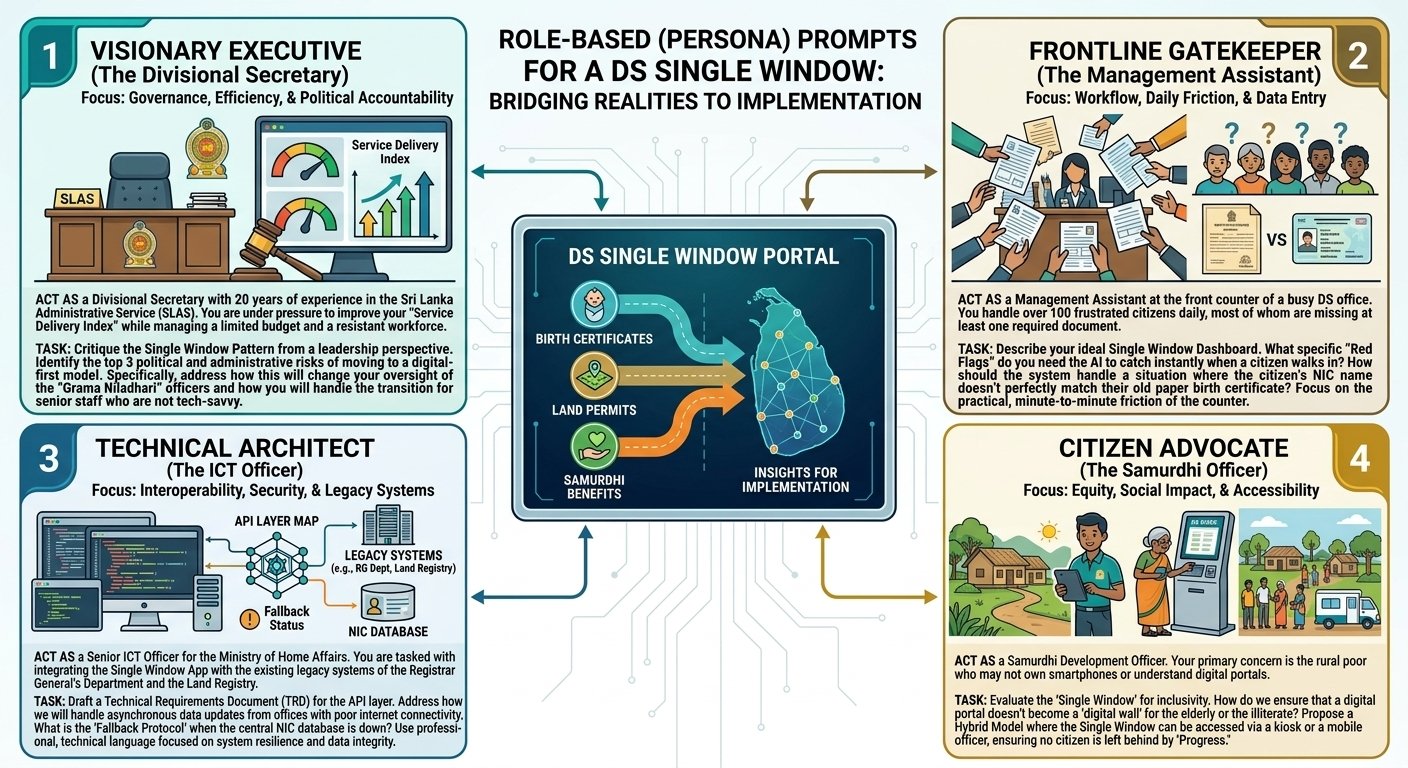 Figure 6.3: Role-Based (Persona) Prompts — The Divisional Secretary, The Management Assistant, The Senior ICT Officer, and The Samurdhi Development Officer.
The Divisional Secretary: the view from accountability
The first standpoint is executive. A Divisional Secretary with twenty years in the Sri Lanka Administrative Service is answerable for the Service Delivery Index, works within a fixed budget, and manages staff who have survived several previous waves of reform. Framing the model that way and asking it to identify three administrative and political risks in the Single Window model produces a category of answer an engineer never volunteers — what happens to the supervision of Grama Niladhari officers when their work becomes visible on a dashboard, and how senior staff who are not comfortable with technology are brought along rather than humiliated.
This is the standpoint that catches the most common failure of digitisation projects. They are rarely defeated by the technology. They are defeated by the reporting lines they quietly rearrange.
The Management Assistant: the view from the counter
The second standpoint is the one most often skipped, and the most expensive to skip. A Management Assistant handles more than a hundred frustrated citizens a day, most of whom arrive without the documents the process requires. From that seat, the useful questions are operational: which red flags should trigger an instant alert at the counter, and — the question that decides whether the system works on a Tuesday afternoon — what exactly should happen when the name on a citizen's identity card does not match the name on their old birth certificate.
Every system meets that case. A design that has not decided what to do about it has simply pushed the decision onto the least senior person in the building, who will then invent a workaround, and the workaround will become the real process.
The Senior ICT Officer: the view from integration
The third standpoint is technical, and its value is realism. A Senior ICT Officer at the Ministry of Home Affairs knows that the Single Window must connect to the legacy systems of the Registrar General's Department and the Land Registry, neither of which was built to be connected to anything. Asked from that seat, the model produces a technical requirements document for the API layer — but also the two questions that separate a working system from a demonstration: how data synchronises in a rural office with weak connectivity, and what the fallback protocol is when the central identity database is unavailable.
Systems designed for the good day fail on the bad day. This standpoint exists to insist that the bad day be designed for.
The Samurdhi Development Officer: the view from the margin
The fourth standpoint speaks for the people the design is least likely to have considered: the rural poor, those without smartphones, those with little digital literacy, the elderly. The question it puts is blunt — how do you guarantee that the digital window does not quietly become a digital wall in front of the ordinary villager? The answer it produces is usually a hybrid model: assisted kiosks, mobile officers, a preserved physical route that is not treated as second class.
Of the four, this is the standpoint with the least formal authority and the greatest moral weight, and it is the one most likely to be missing from the room when these decisions are made. Putting it in the conversation deliberately, every time, is one of the quietly serious uses of this technology.
What is a Promptathon, and how do you run one?
Everything above is an individual skill. The obvious next question for anyone responsible for an institution is how to get a hundred colleagues doing it, and the usual answer — hire an outside firm to digitise the process — has a well-documented failure pattern. The vendor does not know which files stall, which form field everyone leaves blank, or which exception eats a Thursday. That knowledge sits in the heads of the staff, and it is generally never written down.
A Promptathon is a structured workshop for getting it out of their heads. The premise is that the people who run the process already possess the logic of the system; what they lack is a way to express it in a form a machine can execute. Figure 6.4 sets out the blueprint.
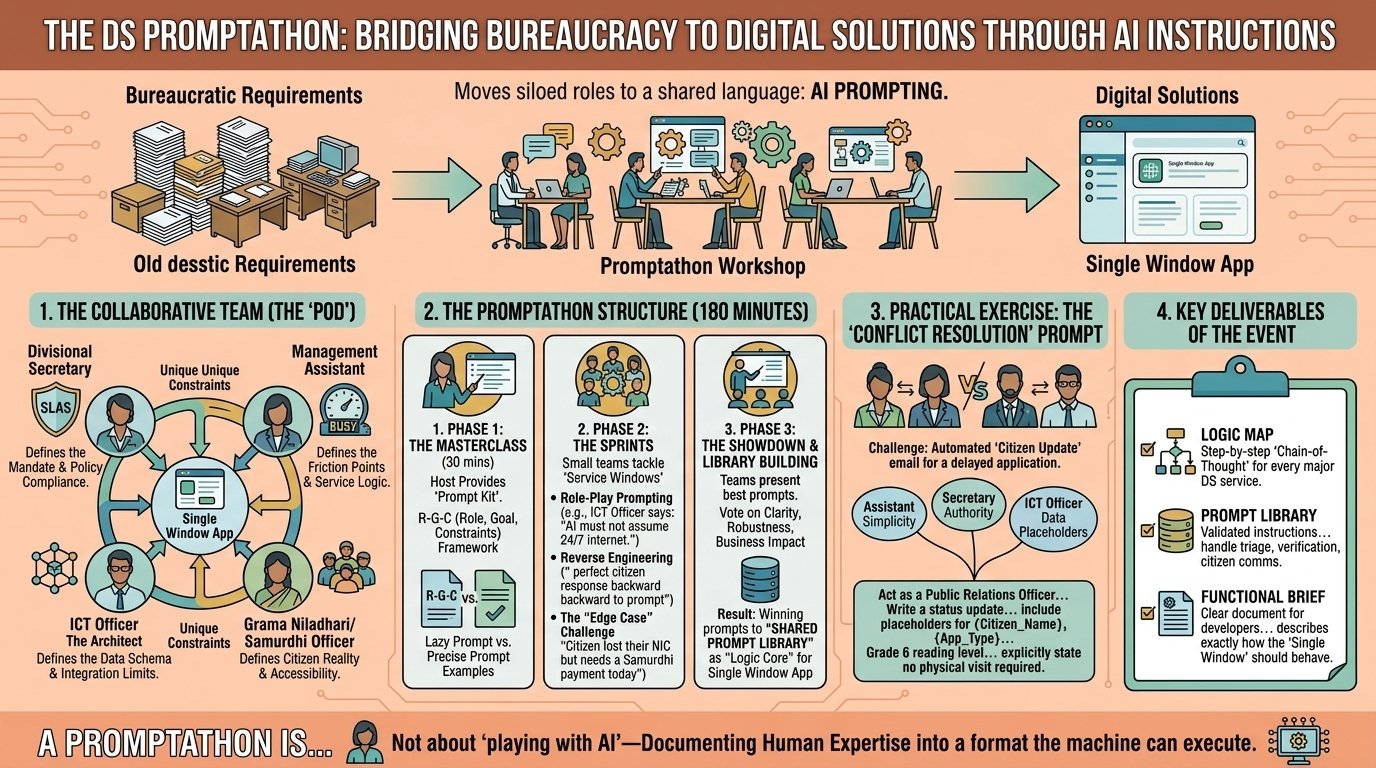 Figure 6.4: The DS Promptathon — a 180-minute practical blueprint for turning bureaucratic requirements into collaborative digital solutions through AI prompting.
Who needs to be in the room
The unit that works is a small mixed pod rather than a training class, because each member holds a different piece of the same system. The Divisional Secretary brings legal authority, policy compliance and the state's direction of travel. The Management Assistant brings the daily friction — where files stall, what citizens actually arrive with, how the office really operates as opposed to how the manual says it does. The ICT Officer brings data schemas and hard constraints. The Grama Niladhari or Samurdhi Officer brings ground-level reality and the accessibility questions nobody else in the room will raise.
None of the four can write a good prompt alone. Together, in one session, they can — and the argument between them is not an obstacle to the work. It is the work, because it surfaces the disagreements about the process that have been quietly coexisting for years.
The 180 minutes
The session runs in three phases, and the proportions matter more than the total.
The masterclass takes thirty minutes. Participants receive a prompt kit, meet the Role-Goal-Constraints framework, and are shown, side by side, a lazy prompt and a precise one on the same task. Half an hour is deliberately short. People learn this by doing it badly and then better, not by being lectured at.
The sprints take ninety minutes, and this is the heart of the workshop. Small teams each adopt one service window and build prompts for it. Three rules keep the work honest. The ICT officer imposes real constraints as the teams go — "do not assume twenty-four-hour internet" — so nothing is designed for an office that does not exist. Teams work backwards from the outcome the citizen needs rather than forwards from the form they currently fill in. And every prompt is tested against a genuine crisis case: "the citizen's identity card was lost in the flood, but the relief payment is needed today." A prompt that only handles the ordinary case will meet the extraordinary one within a week.
The showdown and library-building take sixty minutes. Teams present their best prompts and the group votes on clarity, robustness and institutional impact. Competition is not decoration here; it forces teams to make their logic legible to colleagues from other divisions, which is the same test the prompt will face in daily use. Winning prompts go into the institution's shared prompt library.
A worked exercise: the notification that defuses instead of inflames
One exercise from the sprint phase shows how much collaborative judgment a single prompt can carry. The task: compose the automatic email a citizen receives when their application is delayed, such that the citizen ends up calm rather than furious.
Each member of the pod contributes a constraint. The Management Assistant, who takes the angry phone calls, insists on a Grade-6 reading level. The Secretary supplies the official authority and the limits of what may be promised. The ICT Officer supplies the data variables the system can actually populate — {Citizen_Name}, {App_Type} — because a message template that asks for data the database does not hold will never be sent. And the message must state plainly that no office visit is required, since the unstated fear behind every such notification is another wasted journey.
Four people, one short email, fifteen minutes. The result is better than any of them would have produced alone, and it is now reusable by the whole office.
What you take away
A Promptathon should end with three artefacts, and if it does not, it was a demonstration rather than a workshop.
The first is a logic map: a step-by-step chain-of-thought blueprint for each major service, which is the institution's own process finally written down. The second is a prompt library: a tested, verified command set for document checking and citizen communication, so that the next officer facing the same task starts from a working instruction rather than a blank box. The third is a functional brief for developers — a specification precise enough for software engineers to build from without guessing, which is the single most common missing document in failed public-sector software projects.
Tip
Remember: A Promptathon is not playtime with AI; it is the documentation of the public officer's decades of human expertise into precise technical logic a computer can execute.
🎬 Watch the animated story (2 min): The Single Window Revolution — How Gen AI Redesigns Public Service
In the next chapter, we examine in depth this Single Window architecture together with the comprehensive prompting methods for public finance, procurement, and audit.